
Raspberry Pi - Ultrasone Sensor - Piezo Buzzer

Deze tutorial leert u hoe u de Raspberry Pi en een ultrasone sensor gebruikt om een piezo buzzer te bedienen. In detail:

Hardware Benodigdheden

1×Raspberry Pi 5
1×Ultrasone Sensor
1×3-24V Actieve Piezo Buzzer
1×Actief Piezo Buzzer Module
1×Passief Piezo Buzzer Module
1×Breadboard (experimenteerprint)
1×Jumperdraden
1×(Aanbevolen) Schroefklem Block Shield voor Raspberry Pi
1×(Aanbevolen) Raspberry Pi Prototyping Basisplaat & Breadboard Kit
1×(Aanbevolen) HDMI-Touchscreen-Monitor voor Raspberry Pi

Of u kunt de volgende kits kopen:

1×DIYables Sensorkit (30 sensoren/displays)
1×DIYables Sensorkit (18 sensoren/displays)
Openbaarmaking: Sommige van de links in deze sectie zijn Amazon-affiliate links. We kunnen een commissie ontvangen voor aankopen die via deze links worden gedaan, zonder extra kosten voor u. We waarderen uw steun.

Over Piezo Buzzer en Ultrasone Sensor

Als u niet bekend bent met piezo buzzer en ultrasone sensor (inclusief pinout, werking en programmeren), bieden de volgende tutorials meer informatie:

Aansluitschema
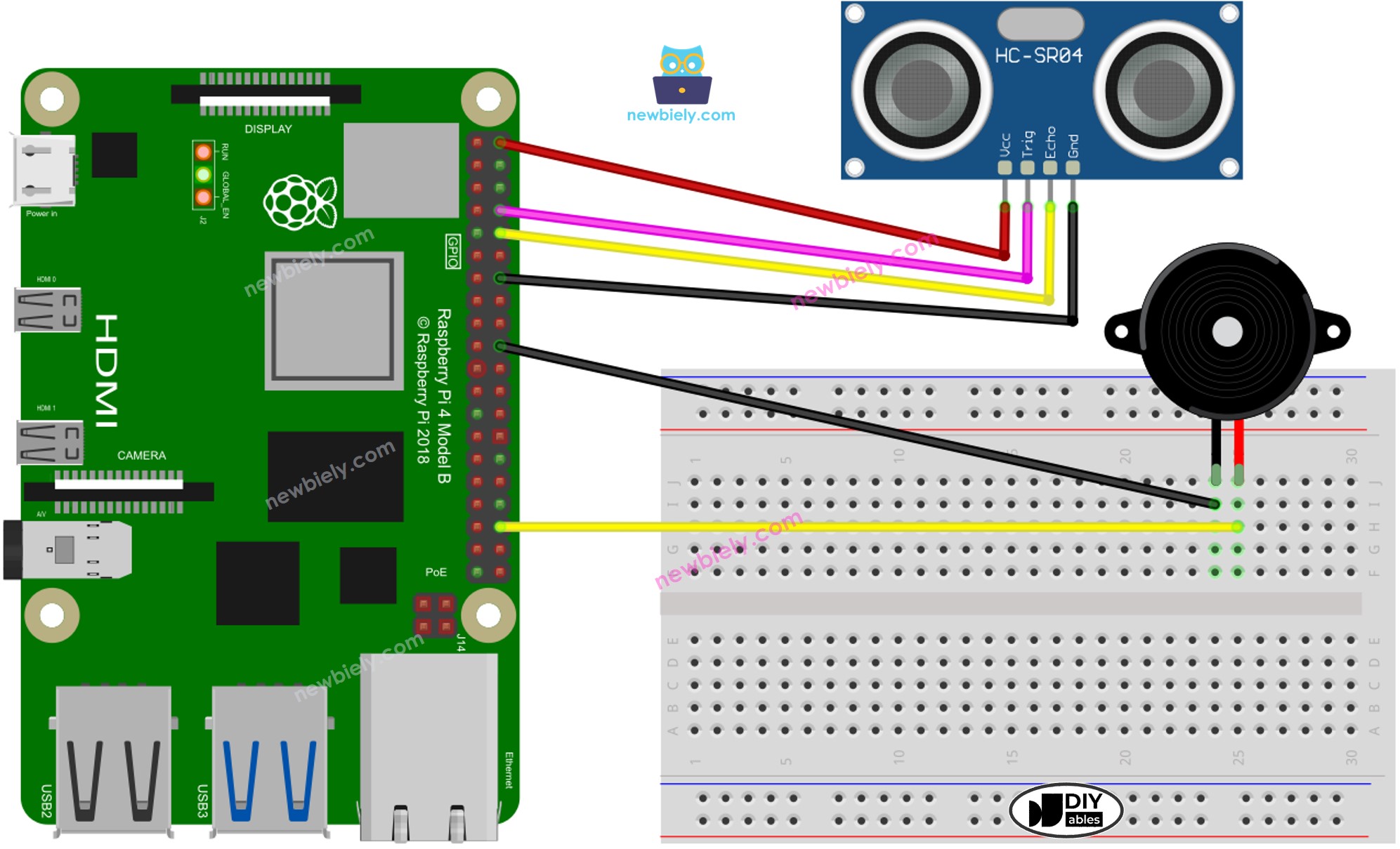
Raspberry Pi Ultrasone Sensor Piezo Buzzer aansluitschema

This image is created using Fritzing. Click to enlarge image

Raspberry Pi Code - Eenvoudig Geluid

In dit gedeelte programmeren we de Raspberry Pi om de piezo buzzer een eenvoudig geluid te laten maken telkens wanneer de gemeten afstand door de ultrasone sensor onder een bepaalde drempelwaarde komt.

Snelle Stappen

  • Zorg dat u Raspbian of een ander Raspberry Pi compatibel besturingssysteem op uw Pi hebt geïnstalleerd.
  • Zorg dat uw Raspberry Pi is verbonden met hetzelfde lokale netwerk als uw pc.
  • Zorg dat uw Raspberry Pi verbonden is met internet als u libraries moet installeren.
  • Als dit uw eerste keer is met Raspberry Pi, bekijk dan hoe u de Raspberry Pi instelt.
  • Verbind uw pc met de Raspberry Pi via SSH met de ingebouwde SSH-client op Linux/macOS of PuTTY op Windows. Zie hoe u uw pc met Raspberry Pi via SSH verbindt.
  • Controleer of de RPi.GPIO library geïnstalleerd is. Zo niet, installeer deze via het volgende commando:
sudo apt-get update sudo apt-get install python3-rpi.gpio
  • Maak een Python scriptbestand aan met de naam ultrasonic_sensor_buzzer.py en voeg de volgende code toe:
# Deze Raspberry Pi code is ontwikkeld door newbiely.nl # Deze Raspberry Pi code wordt zonder enige beperking aan het publiek beschikbaar gesteld. # Voor volledige instructies en schema's, bezoek: # https://newbiely.nl/tutorials/raspberry-pi/raspberry-pi-ultrasonic-sensor-piezo-buzzer import RPi.GPIO as GPIO import time # GPIO pin numbers for the ultrasonic sensor TRIG_PIN = 14 ECHO_PIN = 15 # GPIO pin number for the piezo buzzer BUZZER_PIN = 16 # Threshold distance in centimeters THRESHOLD_DISTANCE_CM = 20 def get_distance(): GPIO.output(TRIG_PIN, GPIO.HIGH) time.sleep(0.00001) GPIO.output(TRIG_PIN, GPIO.LOW) while GPIO.input(ECHO_PIN) == 0: pulse_start = time.time() while GPIO.input(ECHO_PIN) == 1: pulse_end = time.time() pulse_duration = pulse_end - pulse_start speed_of_sound = 34300 # Speed of sound in cm/s distance = (pulse_duration * speed_of_sound) / 2 return distance GPIO.setmode(GPIO.BCM) GPIO.setup(TRIG_PIN, GPIO.OUT) GPIO.setup(ECHO_PIN, GPIO.IN) GPIO.setup(BUZZER_PIN, GPIO.OUT) GPIO.output(TRIG_PIN, GPIO.LOW) GPIO.output(BUZZER_PIN, GPIO.LOW) try: while True: distance = get_distance() print(f"Distance: {distance:.2f} cm") if distance < THRESHOLD_DISTANCE_CM: GPIO.output(BUZZER_PIN, GPIO.HIGH) # Turn the buzzer on else: GPIO.output(BUZZER_PIN, GPIO.LOW) # Turn the buzzer off except KeyboardInterrupt: GPIO.cleanup()
  • Sla het bestand op en start het Python script met het volgende commando in de terminal:
python3 ultrasonic_sensor_buzzer.py
  • Zwaai met uw hand voor de sensor.
  • Luister naar het geluid van de piezo buzzer.

Het script draait in een oneindige lus totdat u Ctrl + C drukt in de terminal.

Code Uitleg

Bekijk de regel-voor-regel uitleg in de commentaren van de broncode!

Raspberry Pi speelt de melodie van het lied

In dit gedeelte programmeren we de Raspberry Pi om een piezo buzzer aan te sturen die het liedje "Jingle Bells" speelt zodra de afstand onder een ingestelde drempel komt.

Snelle Stappen

  • Maak een Python scriptbestand aan met de naam ultrasonic_sensor_buzzer_Jingle_Bells.py en voeg de volgende code toe:
# Deze Raspberry Pi code is ontwikkeld door newbiely.nl # Deze Raspberry Pi code wordt zonder enige beperking aan het publiek beschikbaar gesteld. # Voor volledige instructies en schema's, bezoek: # https://newbiely.nl/tutorials/raspberry-pi/raspberry-pi-ultrasonic-sensor-piezo-buzzer import RPi.GPIO as GPIO import time # GPIO pin numbers for the ultrasonic sensor TRIG_PIN = 14 ECHO_PIN = 15 # GPIO pin number for the piezo buzzer BUZZER_PIN = 16 # Threshold distance in centimeters THRESHOLD_DISTANCE_CM = 20 # Constants for note names and their corresponding frequencies C4 = 261 D4 = 293 E4 = 329 F4 = 349 G4 = 392 A4 = 440 B4 = 493 # Dictionary to map numeric values to note names note_names = { C4: "C4", D4: "D4", E4: "E4", F4: "F4", G4: "G4", A4: "A4", B4: "B4", } # List of notes in the "Jingle Bells" melody melody = [ E4, E4, E4, E4, E4, E4, E4, G4, C4, D4, E4, F4, F4, F4, F4, F4, E4, E4, E4, E4, E4, D4, D4, E4, D4, G4 ] # List of note durations (in milliseconds) note_durations = [ 200, 200, 400, 200, 200, 400, 200, 200, 200, 200, 200, 200, 200, 400, 200, 200, 200, 200, 200, 200, 200, 200, 200, 400, 200, 200 ] # Pause duration between notes (in milliseconds) pause_duration = 300 def play_tone(pin, frequency, duration): # Calculate the period based on the frequency period = 1.0 / frequency # Calculate the time for half of the period half_period = period / 2.0 # Calculate the number of cycles for the given duration cycles = int(duration / period) for _ in range(cycles): # Set the GPIO pin to HIGH GPIO.output(pin, GPIO.HIGH) # Wait for half of the period time.sleep(half_period) # Set the GPIO pin to LOW GPIO.output(pin, GPIO.LOW) # Wait for the other half of the period time.sleep(half_period) def play_jingle_bells(): for i in range(len(melody)): note_duration = note_durations[i] / 1000.0 note_freq = melody[i] note_name = note_names.get(note_freq, "Pause") print(f"Playing {note_name} (Frequency: {note_freq} Hz) for {note_duration} seconds") play_tone(BUZZER_PIN, note_freq, note_duration) time.sleep(pause_duration / 1000.0) GPIO.output(BUZZER_PIN, GPIO.LOW) def get_distance(): GPIO.output(TRIG_PIN, GPIO.HIGH) time.sleep(0.00001) GPIO.output(TRIG_PIN, GPIO.LOW) while GPIO.input(ECHO_PIN) == 0: pulse_start = time.time() while GPIO.input(ECHO_PIN) == 1: pulse_end = time.time() pulse_duration = pulse_end - pulse_start speed_of_sound = 34300 # Speed of sound in cm/s distance = (pulse_duration * speed_of_sound) / 2 return distance GPIO.setmode(GPIO.BCM) GPIO.setup(TRIG_PIN, GPIO.OUT) GPIO.setup(ECHO_PIN, GPIO.IN) GPIO.setup(BUZZER_PIN, GPIO.OUT) GPIO.output(TRIG_PIN, GPIO.LOW) GPIO.output(BUZZER_PIN, GPIO.LOW) try: while True: distance = get_distance() print(f"Distance: {distance:.2f} cm") if distance < THRESHOLD_DISTANCE_CM: play_jingle_bells() except KeyboardInterrupt: GPIO.cleanup()
  • Sla het bestand op en start het Python script met het volgende commando in de terminal:
python3 ultrasonic_sensor_buzzer_Jingle_Bells.py
  • Beweeg uw hand voor de sensor.
  • Luister naar de melodie die door de piezo buzzer wordt afgespeeld.

Code Uitleg

Bekijk de regel-voor-regel uitleg in de commentaren van de broncode!

Video Tutorial

We overwegen het maken van videotutorials. Als u videotutorials belangrijk vindt, abonneer u dan op ons YouTube-kanaal om ons te motiveren de video's te maken.

※ ONZE BERICHTEN

  • U bent welkom om de link naar deze tutorial te delen. Gebruik onze inhoud echter niet op andere websites. We hebben veel moeite en tijd gestoken in het maken van de inhoud, respecteer alstublieft ons werk!