
ESP32 - Rotary Encoder LED
In deze tutorial leert u hoe u de ESP32 programmeert om de helderheid van een LED te regelen op basis van de uitgangswaarde van een rotary encoder.
Hardware Benodigd
Of u kunt de volgende kits kopen:
| 1 | × | DIYables Sensorkit (18 sensoren/displays) |
Openbaarmaking: Sommige van de links in deze sectie zijn Amazon-affiliate links. We kunnen een commissie ontvangen voor aankopen die via deze links worden gedaan, zonder extra kosten voor u. We waarderen uw steun.
Over LED en Rotary Encoder
Bent u nog niet bekend met LED’s en rotary encoders, inclusief hun pinouts, functionaliteit en programmering? Verken de uitgebreide tutorials over deze onderwerpen hieronder:
Bedradingsschema
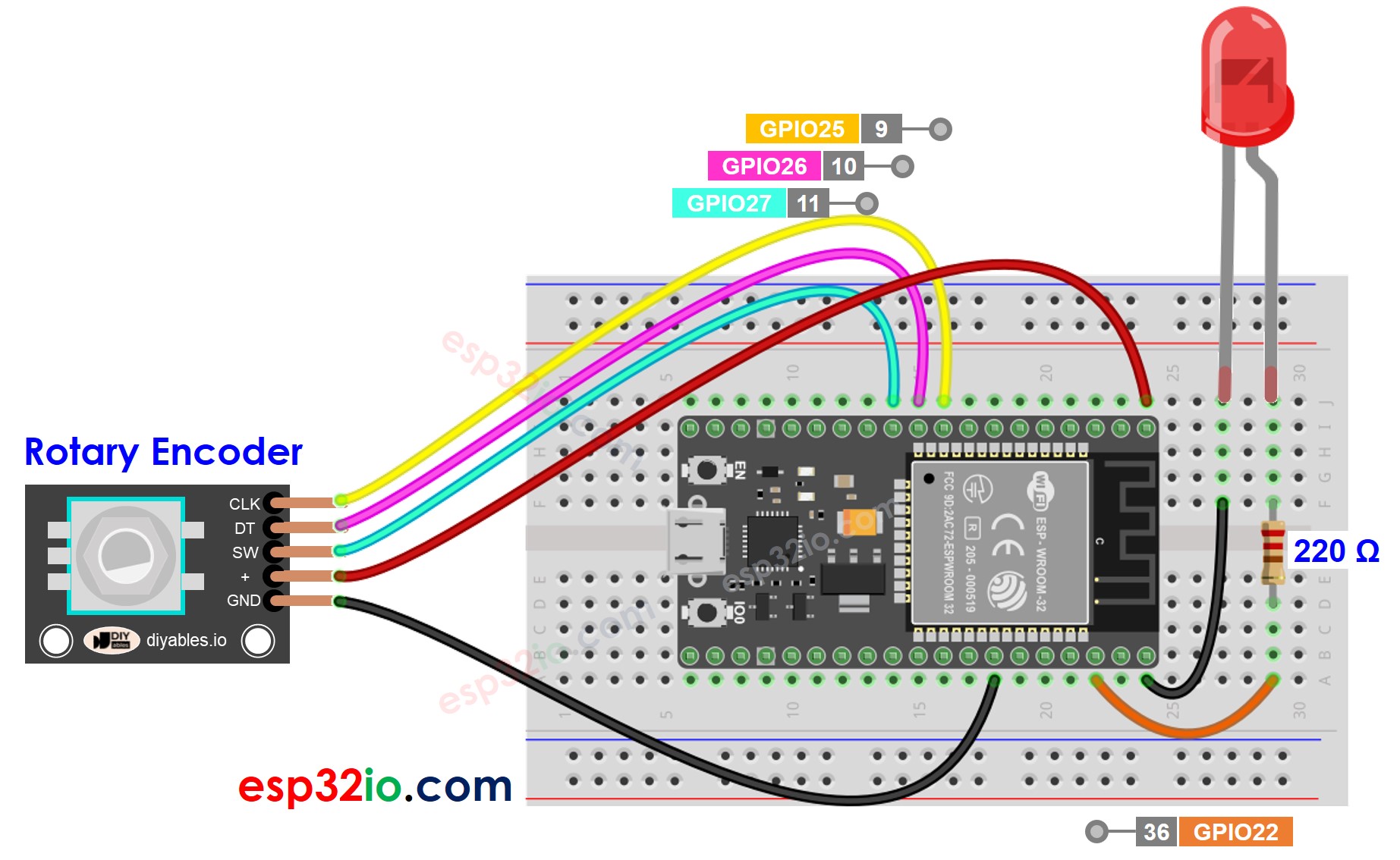
Deze afbeelding is gemaakt met Fritzing. Klik om de afbeelding te vergroten.
ESP32 Code
/*
* Deze ESP32 code is ontwikkeld door newbiely.nl
* Deze ESP32 code wordt zonder enige beperking aan het publiek beschikbaar gesteld.
* Voor volledige instructies en schema's, bezoek:
* https://newbiely.nl/tutorials/esp32/esp32-rotary-encoder-led
*/
#include <ESP32Servo.h>
#define CLK_PIN 25 // ESP32 pin GPIO25 connected to the rotary encoder's CLK pin
#define DT_PIN 26 // ESP32 pin GPIO26 connected to the rotary encoder's DT pin
#define SW_PIN 27 // ESP32 pin GPIO27 connected to the rotary encoder's SW pin
#define LED_PIN 22 // ESP32 pin GPIO22 connected to the LED
#define DIRECTION_CW 0 // clockwise direction
#define DIRECTION_CCW 1 // counter-clockwise direction
int counter = 0;
int direction = DIRECTION_CW;
int CLK_state;
int prev_CLK_state;
int brightness = 125; // middle value
void setup() {
Serial.begin(9600);
// configure encoder pins as inputs
pinMode(CLK_PIN, INPUT);
pinMode(DT_PIN, INPUT);
// read the initial state of the rotary encoder's CLK pin
prev_CLK_state = digitalRead(CLK_PIN);
pinMode(LED_PIN, OUTPUT);
}
void loop() {
// read the current state of the rotary encoder's CLK pin
CLK_state = digitalRead(CLK_PIN);
// If the state of CLK is changed, then pulse occurred
// React to only the rising edge (from LOW to HIGH) to avoid double count
if (CLK_state != prev_CLK_state && CLK_state == HIGH) {
// if the DT state is HIGH
// the encoder is rotating in counter-clockwise direction => decrease the counter
if (digitalRead(DT_PIN) == HIGH) {
direction = DIRECTION_CCW;
counter--;
brightness -= 10; // you can change this value
} else {
// the encoder is rotating in clockwise direction => increase the counter
direction = DIRECTION_CW;
counter++;
brightness += 10; // you can change this value
}
if (brightness < 0)
brightness = 0;
else if (brightness > 255)
brightness = 255;
// sets the brightness of LED according to the counter
analogWrite(LED_PIN, brightness);
Serial.print("COUNTER: ");
Serial.print(counter);
Serial.print(" | BRIGHTNESS: ");
Serial.println(brightness);
}
// save last CLK state
prev_CLK_state = CLK_state;
}
Snelle Stappen
- Als dit de eerste keer is dat u ESP32 gebruikt, bekijk dan hoe u de omgeving voor ESP32 instelt in Arduino IDE.
- Maak de bedrading zoals afgebeeld in de bovenstaande afbeelding.
- Verbind de ESP32 met uw pc via een micro USB-kabel.
- Open de Arduino IDE op uw pc.
- Selecteer het juiste ESP32 bord (bijvoorbeeld ESP32 Dev Module) en de juiste COM-poort.
- Verbind ESP32 met de pc via USB-kabel
- Open Arduino IDE, selecteer het juiste bord en de juiste poort
- Kopieer de bovenstaande code en open deze in Arduino IDE
- Klik op de knop Upload in Arduino IDE om de code naar de ESP32 te uploaden
- Open de Serial Monitor
- Draai aan de rotary encoder
- Observeer de helderheid van de LED
- Bekijk het resultaat in de Serial Monitor
8
Serial.println("Hello World!");
Message (Enter to send message to 'ESP32 Dev Module' on 'COM15')
New Line
9600 baud
COUNTER: 1 | BRIGHTNESS: 135
COUNTER: 2 | BRIGHTNESS: 145
COUNTER: 3 | BRIGHTNESS: 155
COUNTER: 4 | BRIGHTNESS: 165
COUNTER: 5 | BRIGHTNESS: 175
COUNTER: 6 | BRIGHTNESS: 185
COUNTER: 7 | BRIGHTNESS: 195
Code Uitleg
Lees de regel-voor-regel uitleg in de commentaarregels van de broncode!
Video Tutorial
We overwegen het maken van videotutorials. Als u videotutorials belangrijk vindt, abonneer u dan op ons YouTube-kanaal om ons te motiveren de video's te maken.
Gerelateerde Tutorials
📱 Aanbevolen apps
 English for KidsSpelenderwijs Engels leren voor jonge kinderen.Ontdek het opGoogle PlayBeschikbaar in deApp Store
 Bubble NoteZelfverwijderende notities – schrijf ze als berichten.Ontdek het opGoogle PlayBeschikbaar in deApp Store
 Didn't BuyVersla impulsaankopen en bespaar meer.Ontdek het opGoogle PlayBeschikbaar in deApp Store
 Knowledge PathOefentoetsen om alles te leren.Ontdek het opGoogle PlayBeschikbaar in deApp Store