
Arduino - DC Motor - Eindschakelaar
In deze Arduino-handleiding leert u hoe u een Arduino gebruikt om een DC motor te besturen met een eindschakelaar (limit switch) en de L298N driver. Concreet leert u:
- Hoe u de DC motor stopt wanneer een eindschakelaar wordt ingedrukt
- Hoe u de draairichting van de DC motor wijzigt wanneer een eindschakelaar wordt ingedrukt
- Hoe u de draairichting van een DC motor wijzigt wanneer twee eindschakelaars worden ingedrukt
Hardware Benodigdheden
Of u kunt de volgende kits kopen:
| 1 | × | DIYables Sensorkit (18 sensoren/displays) |
Over DC Motor en Eindschakelaar
Als u nog niet bekend bent met DC motor en eindschakelaar (pinout, werking, programmeren ...), bekijk dan de volgende tutorials:
- Arduino - Eindschakelaar tutorial
- Arduino - Besturing DC Motor tutorial
Aansluitschema
Deze handleiding bevat Arduino code voor twee situaties: één DC motor + één eindschakelaar, én één DC motor + twee eindschakelaars.
- Aansluitschema voor de DC motor en één eindschakelaar
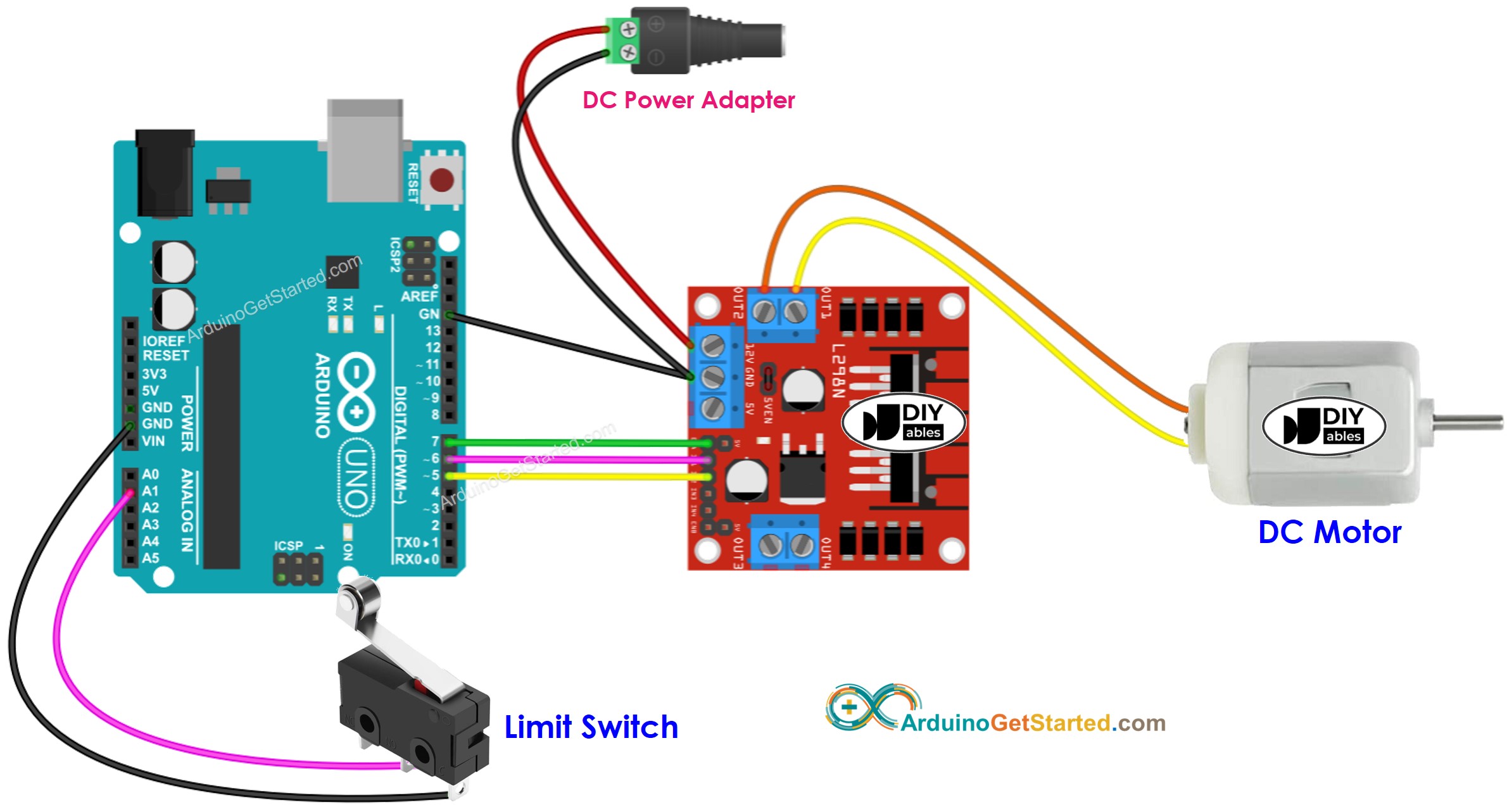
Deze afbeelding is gemaakt met Fritzing. Klik om de afbeelding te vergroten.
- Aansluitschema voor de DC motor en twee eindschakelaars
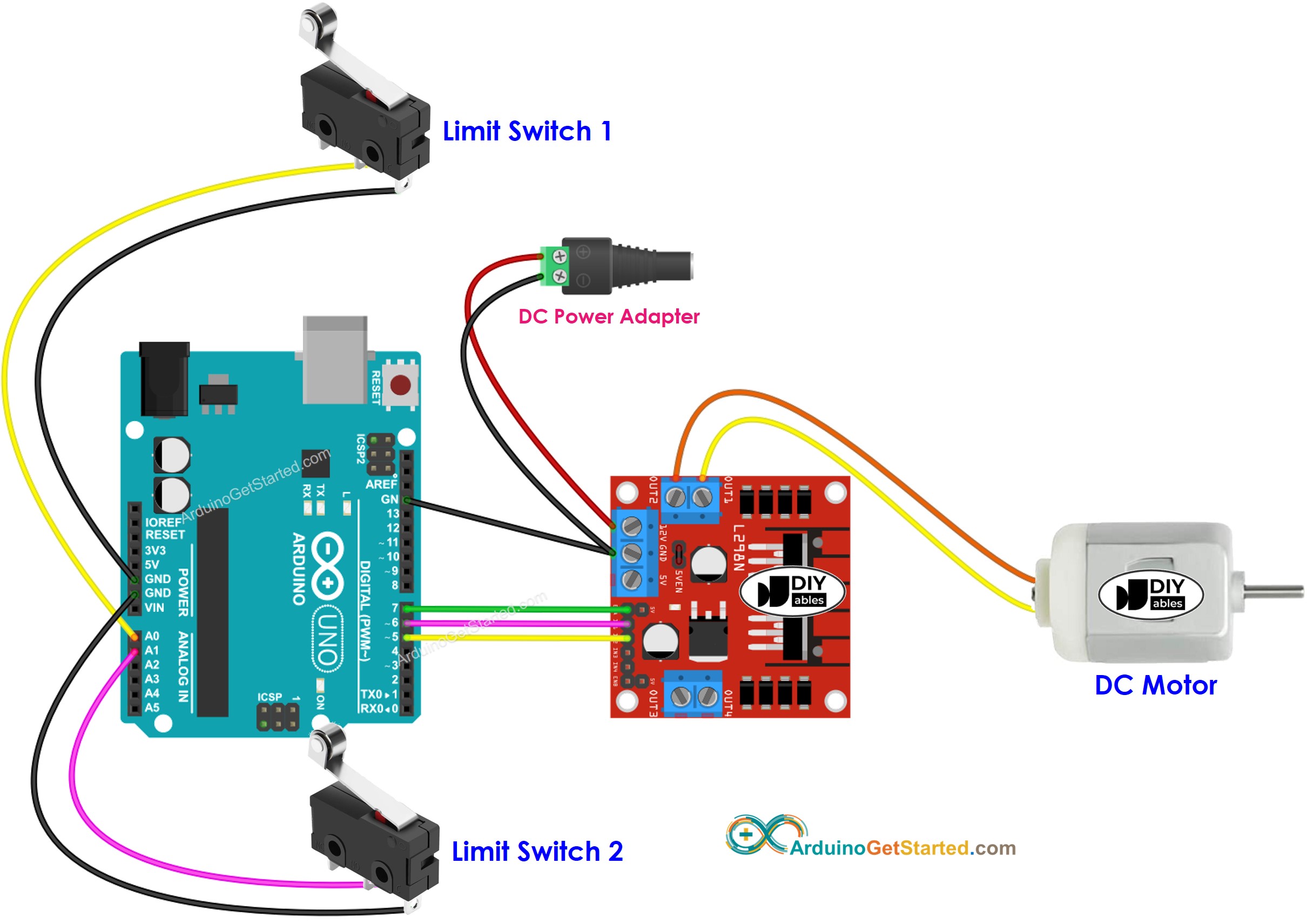
Deze afbeelding is gemaakt met Fritzing. Klik om de afbeelding te vergroten.
Arduino Code - DC Motor Stoppen met een Eindschakelaar
De onderstaande code laat een DC motor continu draaien en stopt deze direct zodra een eindschakelaar wordt ingedrukt
Snelle Stappen
- Verbind de Arduino met de pc via de USB kabel
- Open de Arduino IDE, selecteer het juiste board en de juiste poort
- Ga naar het Libraries-icoon in de linker balk van de Arduino IDE
- Zoek op “ezButton”, en vind de knopbibliotheek van ArduinoGetStarted.com
- Klik op de Installeren-knop om de ezButton bibliotheek te installeren
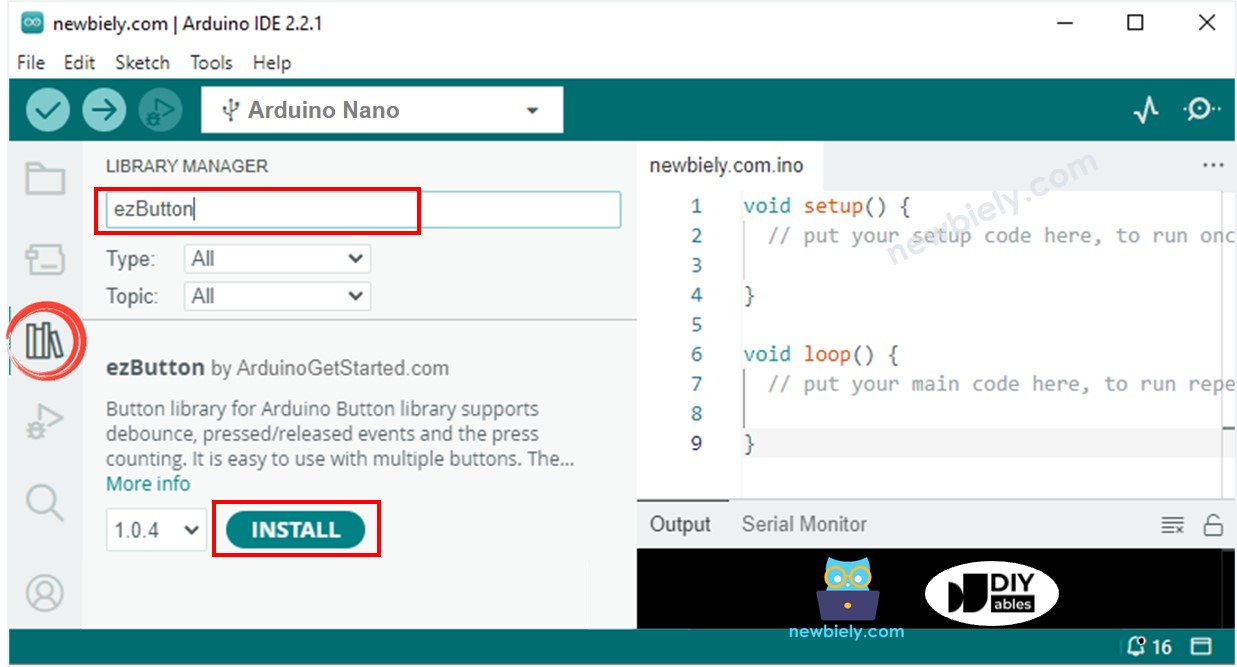
- Kopieer de bovengenoemde code en open deze in de Arduino IDE
- Klik op de Upload-knop in de Arduino IDE om de code te uploaden naar de Arduino
- Als de bedrading correct is, draait de motor in klokwijzerzin
- Druk de eindschakelaar in
- U zult zien dat de motor direct stopt
- Het resultaat op de Seriële Monitor ziet er als volgt uit:
Code Uitleg
Lees de regel-voor-regel uitleg in de commentaarregels van de code!
Arduino Code - Draairichting DC Motor Veranderen met een Eindschakelaar
De onderstaande code laat een DC motor continu draaien en verandert de draairichting zodra een eindschakelaar wordt ingedrukt
Snelle Stappen
- Kopieer de bovengenoemde code en open deze in de Arduino IDE
- Klik op de Upload-knop om de code naar de Arduino te uploaden
- Indien de bedrading correct is, draait de motor in klokwijzerzin
- Druk de eindschakelaar in
- U zult zien dat de draairichting van de DC motor verandert naar tegen de klok in
- Druk de eindschakelaar opnieuw in
- U zult zien dat de draairichting verandert naar klokwijzerzin
- Het resultaat op de Seriële Monitor ziet er als volgt uit:
Arduino Code - Draairichting DC Motor Veranderen met twee Eindschakelaars
De onderstaande code laat een DC motor continu draaien en verandert de draairichting zodra één van twee eindschakelaars wordt ingedrukt
Snelle Stappen
- Kopieer de bovengenoemde code en open deze in de Arduino IDE
- Klik op de Upload-knop om de code naar de Arduino te uploaden
- Indien de bedrading correct is, draait de motor in klokwijzerzin
- Druk eindschakelaar 1 in
- U zult zien dat de draairichting van de DC motor verandert naar tegen de klok in
- Druk eindschakelaar 2 in
- U zult zien dat de draairichting verandert naar klokwijzerzin
- Het resultaat op de Seriële Monitor ziet er als volgt uit:
Video Tutorial
We overwegen het maken van videotutorials. Als u videotutorials belangrijk vindt, abonneer u dan op ons YouTube-kanaal om ons te motiveren de video's te maken.
Bekijk onze video-tutorial voor een visuele begeleiding bij dit project! De video biedt extra inzichten en helpt u sneller aan de slag te gaan.
Gerelateerde Tutorials
📱 Aanbevolen apps
 English for KidsSpelenderwijs Engels leren voor jonge kinderen.Ontdek het opGoogle PlayBeschikbaar in deApp Store
 Bubble NoteZelfverwijderende notities – schrijf ze als berichten.Ontdek het opGoogle PlayBeschikbaar in deApp Store
 Didn't BuyVersla impulsaankopen en bespaar meer.Ontdek het opGoogle PlayBeschikbaar in deApp Store
 Knowledge PathOefentoetsen om alles te leren.Ontdek het opGoogle PlayBeschikbaar in deApp Store